
Every warrant your agency issues, on one system
Officers and clerks prepare applications from any device. Each one routes to a judge who can act now. Hearings are sworn over video, judges sign electronically, and service and returns are tracked through to database clearance. Launch it as a standalone system, or integrated with the case management system of your choice.
See the job it does: Warrant Turnaround →
Looking up your own warrant or court date? eCourtDate serves courts and justice agencies. For the status of a warrant, a court date, or a case, contact the court that issued it.
- Up to 90%
- Faster warrant processing
- 15 minutes
- Average turnaround, request to signed
- 24/7
- On-call coverage, with escalation if a judge cannot answer
- CJIS
- Compliant, hosted on AWS GovCloud
A warrant moves at the speed of a car, and everyone waits on it.
Paper warrant workflows stall between application, judicial review, and service. Officers call down a list looking for a judge who is awake and reachable, then drive to find one. Prosecutors and clerks ask whether it has been signed yet, because nobody shares a current view. In the hours that takes, the scene changes, evidence degrades, and the window closes. Electronic Warrants takes the courier run out of it.
Law enforcement
Finding a judge who is awake and on call, then driving to them, burns the hours that matter most. The officer is off the street the whole time.
Judges
Warrants arrive at every hour, from agencies spread across a county, with no shared view of what is pending or how long it has waited.
Court staff
Coordinating applications, approvals, returns, and database entries across departments and locations is manual work that nobody has time for.
The public
Due process depends on warrants being issued on evidence, served correctly, and cleared promptly. Paper delay puts all three at risk.
How a warrant moves
From an application written in the field to a warrant served, returned, and cleared from every database, on one system.
- 1
Prepare on any device
An officer or clerk completes a structured application from the field, attaches the narrative and supporting documents, and signs it electronically.
- 2
Approve before the bench
The application routes through supervisor and prosecutor review where your agency requires it. Each reviewer can approve, annotate, return it, or reject it with a reason.
- 3
Route to a judge who can act
The warrant reaches a judge by rotation, lightest load, on-call schedule, or a manual pick, and escalates to the full bench if it sits unactioned.
- 4
Swear in and sign
The judge opens a video hearing to swear the affiant in where the jurisdiction requires it, then signs, amends, rejects, or asks for more information.
- 5
Serve and register
The signed warrant reaches the serving agency immediately, registers with local, state, and national databases, and becomes visible to registered agencies running a lookup.
- 6
Return and clear
Officers log attempts and execution from the field, returns and inventory file back to the clerk, and the warrant clears from every database automatically.
An application the officer cannot get wrong
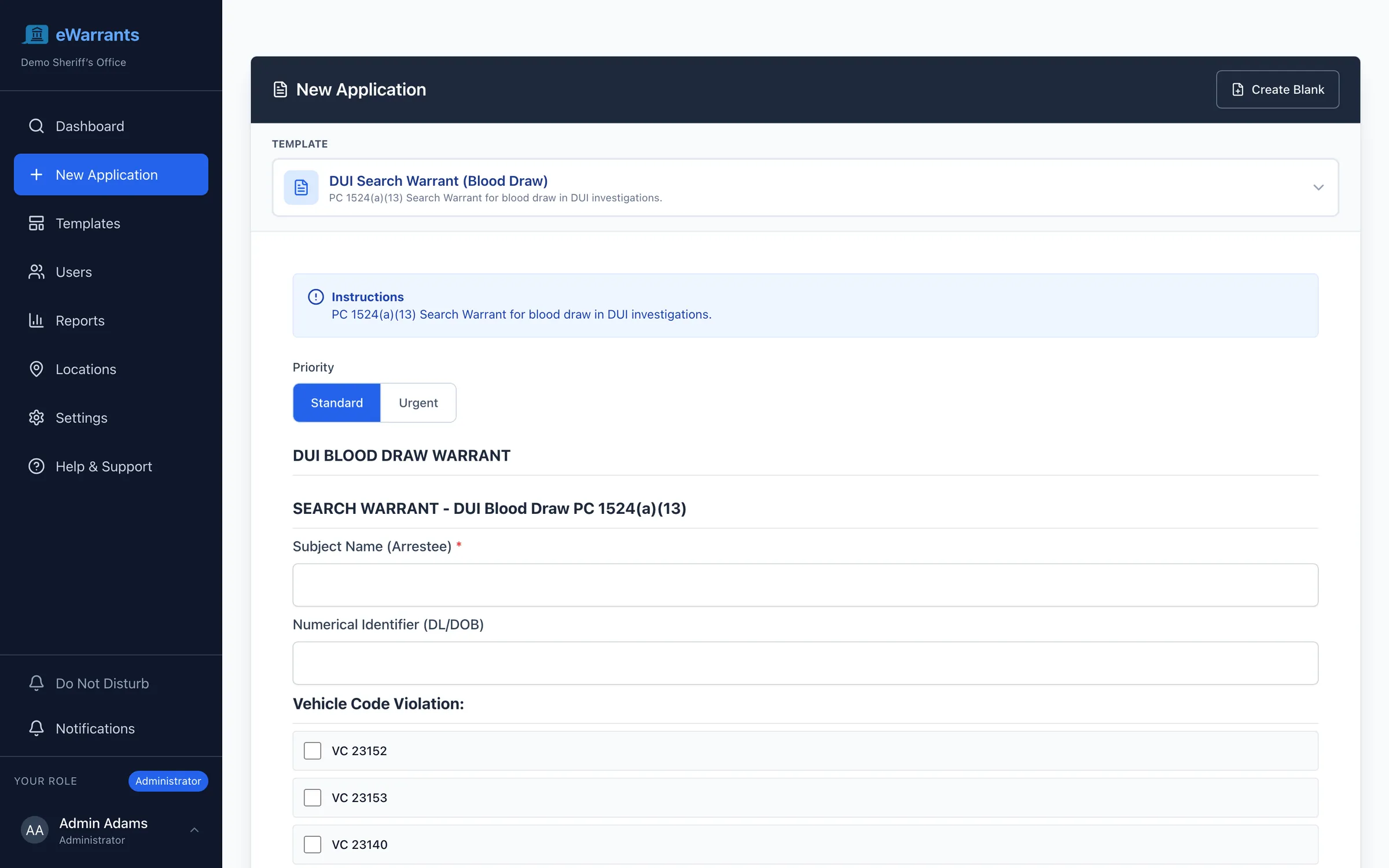
Pick the form, set the priority, and fill in what the affidavit needs. Required fields are marked and checked before submission, so a warrant does not come back at 3am because the time of the stop was left blank.
The warrant finds a judge who can act now
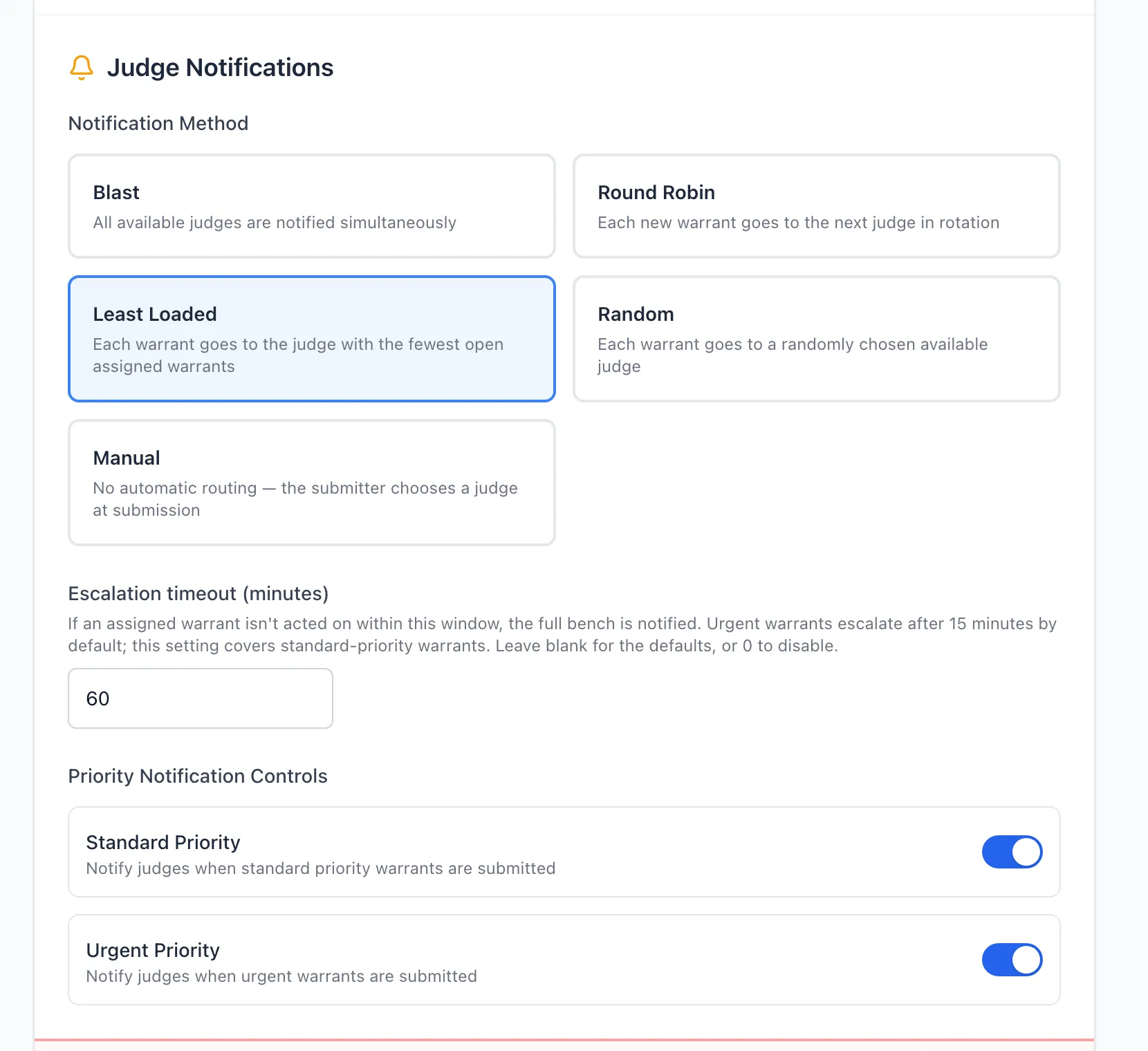
Most systems route to whoever is on call and stop there. Your agency chooses how warrants reach the bench, and the system keeps working when the first judge cannot answer.
Whole bench
Notify every available judge at once. The first to respond signs.
Rotation
Each judge takes the next warrant in turn. Volume stays even across the bench.
Lightest load
Route to the judge with the fewest warrants open right now.
On-call schedule
Route to whoever holds the duty shift, including nights and weekends.
Manual assignment
The submitting agency picks a judge when the matter calls for one.
Random
Distribute without pattern where your jurisdiction requires it.
Nothing waits on one person
- Judges set do-not-disturb hours and days, and routing skips them while they are off duty.
- An urgent warrant left unactioned escalates to the whole bench on the timer your agency sets for that priority.
- Assignment is a routing preference, never a lock. Any judge on the bench can still act.
- Every routing decision is recorded: who was asked, when, under which rule, and who ultimately signed.
Approvals on the way to the bench
Routing decides which judge sees the warrant. Approvals decide who signs off before it gets there. Configure the chain per form type, because a blood draw and a bench warrant do not need the same review.
- 01
Supervisor review
A sergeant or watch commander confirms the application is complete and the case supports it, before it leaves the agency.
- 02
Prosecutor review
The district attorney reviews for legal sufficiency, annotates, returns it for more, or approves it for the bench.
- 03
Second approval on amendments
Where your agency requires it, a change to an approved application needs a second signature before it moves on.
Any stage can be turned off. An agency that sends applications straight to the bench configures exactly that.
Your warrant forms, in your court format
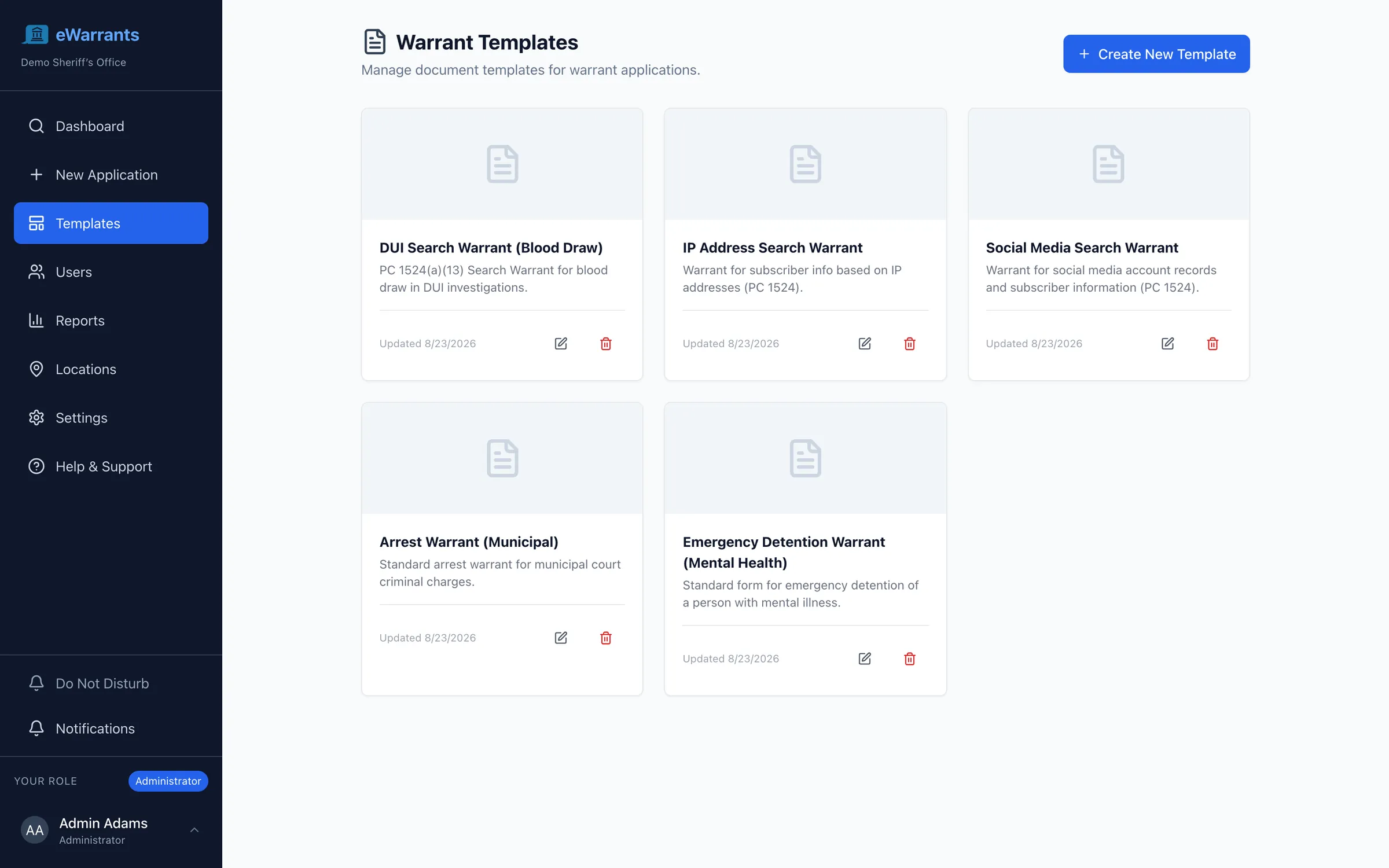
Warrant forms are local. Legacy systems answer a form change with a change order and a release date. Your staff author the forms instead: arrest, search, bench, blood draw, emergency detention, digital evidence, and any order type your bench issues.
Build your own forms
A drag-and-drop editor for warrant and order forms. Add fields, set what is required, and control who may fill each section. Nothing waits on a vendor release.
Bring the form you use today
Upload the Word or PDF form your court already issues and it becomes a working template with fillable fields. Your bench sees the document it expects.
Your court formatting
Style presets hold the layout, headers, and typography your court requires. A signed warrant prints the way it always has.
Edit together, safely
Staff work on the same warrant document with live presence and edit locking. Two people never overwrite each other mid-application.
Swear the affiant in without anyone driving anywhere
Where the jurisdiction requires testimony under oath, the judge opens a video hearing from the warrant itself and swears the affiant in from wherever they are. The judge signs at the end of the hearing. Matters that need a third voice on the record, such as a physician on an emergency detention warrant, get one.
No separate meeting link to send, no third-party video account for the bench to manage, and no recording sitting in someone's cloud drive afterward.
On the record, by default
- Multi-party video, for the matters that need more than the affiant and the judge on the record.
- Recording follows your agency consent policy, from always-on to explicit consent from every participant.
- The recording is kept with the warrant, and every playback and download is logged by name.
- Joining from a second device never drops the first. A judge can move from desk to phone mid-hearing.
The signature is halfway. Serving is the rest.
Most warrant systems go quiet the moment a judge signs, and the second half of the job goes back to radio calls, paper returns, and a clerk keying a clearance into a state database. Electronic Warrants carries the warrant through service, return, and clearance on the same record.
Straight to the serving agency
The moment a warrant is signed it reaches the officers who will serve it, on the device already in their hand. No dispatch relay, no printout left on a desk.
Every attempt on the record
Officers log each attempt from the field: when, where, who answered the door, and why it did not result in service. Photos and notes attach to the attempt.
The next attempt is planned, not guessed
Log an outcome and set the follow-up: a different address, a different hour, a different shift. Warrants that need another attempt surface instead of going quiet.
Supervisors see the pattern
Three failed attempts at the same address at the same time of day is a visible fact, not something a sergeant has to reconstruct from notebooks.
Electronic service
Where your jurisdiction allows service by electronic means, serve from the system and capture proof of delivery with the warrant.
Returns and inventory
The return and any inventory file back to the issuing court electronically, with reminders to the officer if a return is coming due.
Clears itself
Once served, quashed, or expired, the warrant clears from local, state, and national databases automatically. Nobody is arrested on a warrant that no longer exists.
Everyone told, once
The clerk, the prosecutor, the issuing judge, and the requesting officer are notified at each status change, so nobody calls to ask where it stands.
The cheapest service attempt is the one you do not have to make
On a bench or failure to appear warrant, the person named often does not know it exists, and would resolve it if someone told them. Every warrant names a person, and that person is a record with contact information, a language, and a history, not a name typed into a field.
One record for the person
Known addresses, phone numbers, email, aliases, identifiers, and language preference, with every warrant naming that person visible in one place.
Reach them before another attempt
Send a text or email in the language they read, with what the warrant is for and how to resolve it. One message can close a bench warrant that three attempts would not.
Physical mail when digital will not reach
Generate and send letters to the last known address, tracked against the warrant, for people without a phone number on file or without reliable service.
A way to resolve it
Point the person at a court date to schedule, a payment to make, or a number to call, so the outcome can be a resolved matter rather than an arrest.
Outreach is a setting, and it is off unless you turn it on
Notifying the person named on a warrant is right for a bench warrant and wrong for a search warrant. Your agency decides which warrant types allow outreach, who can send it, and at what point in the lifecycle. A search warrant, a sealed matter, and anything your agency flags as high risk never notify anyone, and the control sits with the agency rather than with whoever is holding the file.
The officer who finds the person is rarely the agency that issued the warrant
A deputy two counties over runs a name at 1am and needs to know, right then, whether a warrant is active and who issued it. Today that is a phone call to a dispatcher who calls another dispatcher, and the answer can be hours stale.
Registered agencies query the warrant directly and get a live answer, under permissions the issuing agency controls and an audit log nobody can quietly edit.
- Registered agencies query whether a person has an active warrant, and see the issuing agency, warrant type, and current status.
- Results are live. A warrant served or quashed an hour ago does not come back as active.
- Access is granted agency by agency and role by role, and can be withdrawn at any time.
- Every lookup is logged with who ran it, when, and on whom, so misuse is answerable rather than invisible.
- Sealed and confidential warrants are never exposed to a lookup, whatever the requesting agency holds.
- Mutual-aid and task-force partners work the same warrant without faxing anything or calling dispatch.
The conversation belongs on the warrant
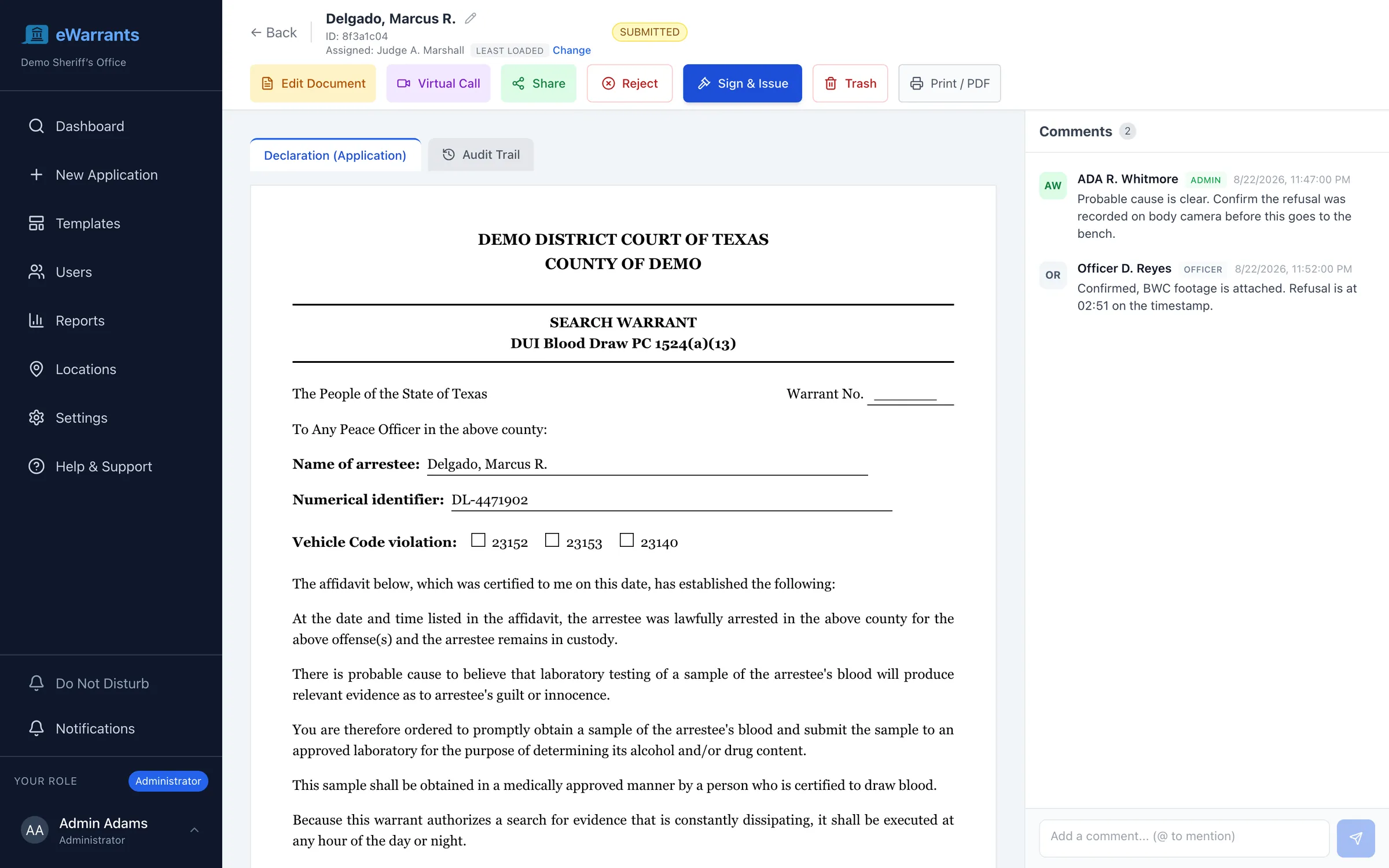
A prosecutor's question about probable cause should not live in a text thread nobody can find later. Comments sit on the warrant itself, attributed and timestamped, and become part of the record rather than a separate story about it.
Staff still work where they work. Warrant activity pushes into Microsoft Teams or Slack, so the channel your bench already watches is where an urgent warrant shows up.
- Threaded comments on the warrant itself, so the discussion and the document never separate.
- Mention a colleague and they are notified, on the channel they chose.
- Reviewer-only comments stay internal and are never visible to the applicant.
- Push warrant activity into Microsoft Teams or Slack, so an urgent warrant lands in the channel your bench already watches.
- Every comment is part of the record, attributed and timestamped alongside the warrant history.
One screen, everything the judge needs
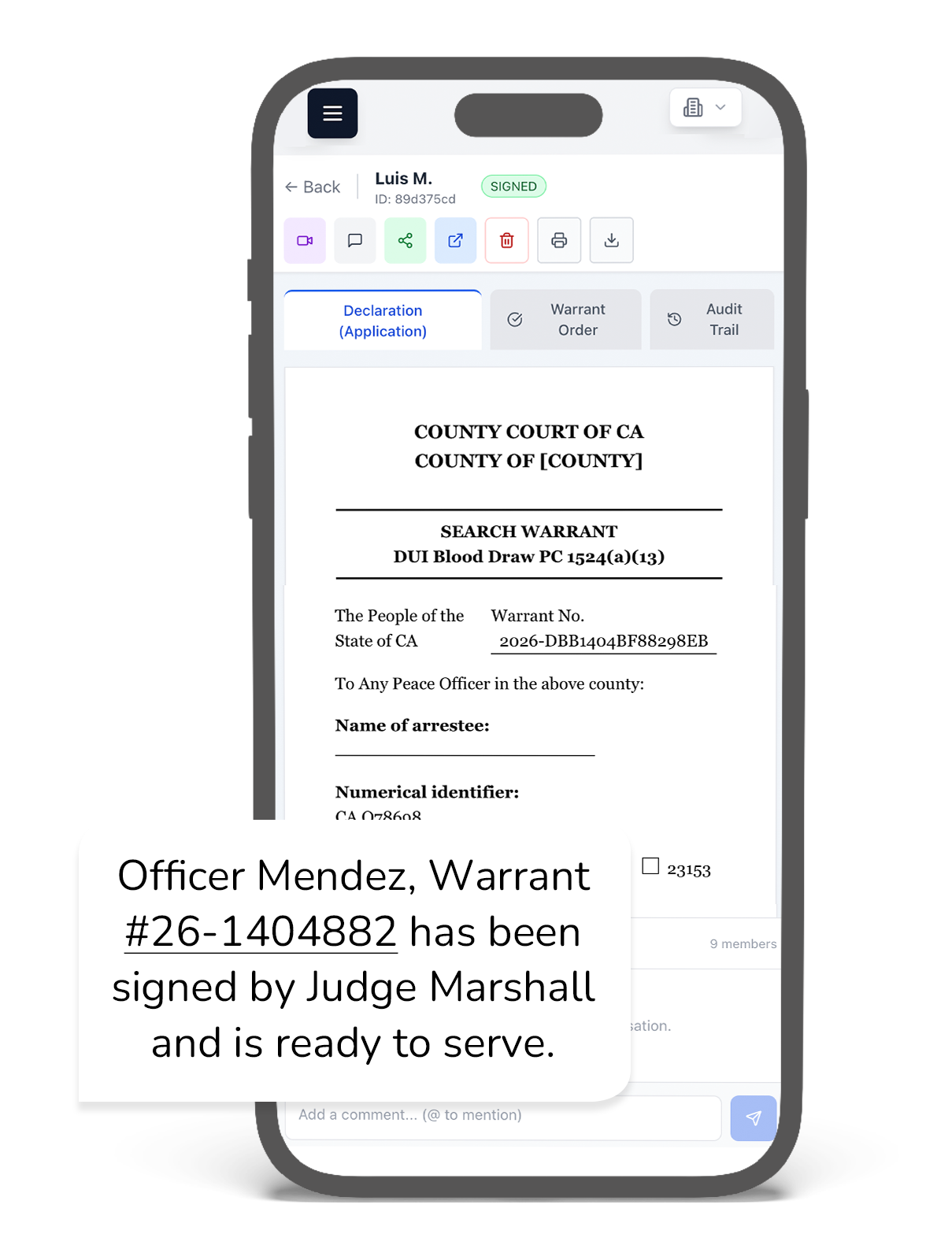
The document as it will be issued, the discussion beside it, the assignment and how it was made, and the full audit trail a tab away. Sign, reject, open a hearing, or share, without leaving the warrant.
However your bench and your officers work
A judge signing at 2am on a phone and a clerk working a queue on two monitors need different things from the same system.
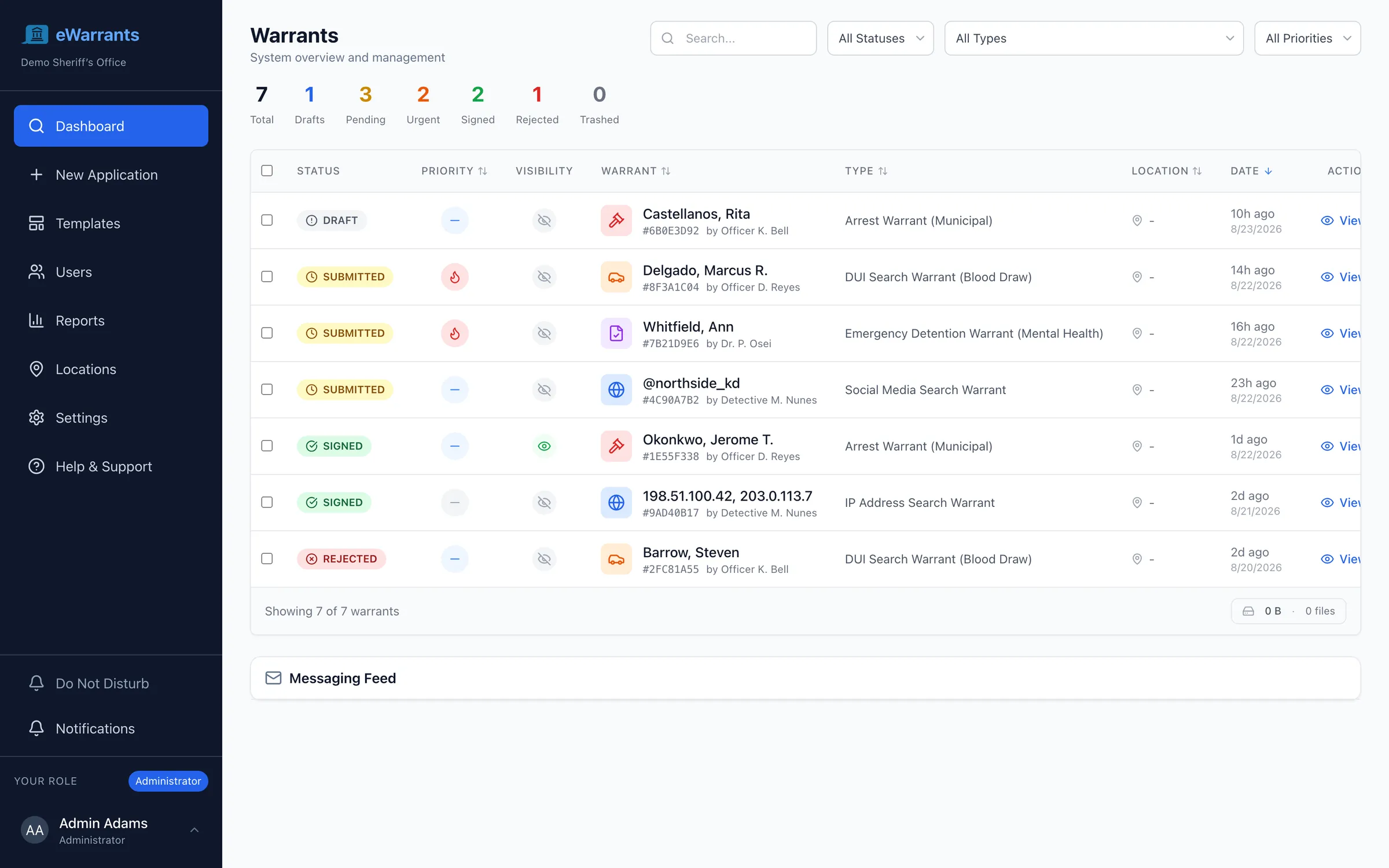
A prioritized inbox
Judges and reviewers open one queue: urgent first, longest-waiting surfaced, filtered by status, form type, and priority. No hunting for what needs a signature.
Desktop app
Install it on Windows or macOS and it opens like any other application, with notifications that reach the judge whether or not a browser is open.
Mobile app
A native iOS and Android application for officers in the field and judges on call, with push notifications and offline drafting.
Calendar integration
On-call schedules sync with Google Calendar, Microsoft Outlook, and Apple Calendar, so routing follows the duty roster your bench already keeps.
Everything inside Electronic Warrants
A complete warrant system, configurable to how your agency and your bench already work.
Any-Device Preparation
Officers and clerks prepare applications from a phone, tablet, or laptop. Structured forms catch a missing field before it reaches the bench.
Approval Workflows
Route through supervisor and prosecutor review before the bench, configured per form type. Amendments can require a second approval.
Intelligent Judge Routing
Route each warrant to a judge who can act now: round-robin, least-loaded, random, a manual pick, or the whole bench at once.
Automatic Escalation
An urgent warrant left unactioned escalates to the full bench on your agency timer. Nothing waits on one unreachable judge.
Prioritized Review Queue
Judges and reviewers open one inbox with urgent matters first and the longest-waiting warrant surfaced, filtered by status, type, and priority.
Sworn Virtual Hearings
Swear the affiant in over multi-party video, with recording governed by your agency consent policy and kept with the warrant.
Electronic Signatures
Judges review, amend, sign, or reject from any device, with identity confirmed by single sign-on and multi-factor authentication.
Your Own Warrant Forms
Build forms in a drag-and-drop editor, or upload the Word or PDF form you use today and keep your court formatting.
Comments and Mentions
Discuss a warrant on the warrant. Mention a colleague, keep reviewer-only notes internal, and push every thread to Microsoft Teams or Slack.
Service Attempt Tracking
Log each attempt from the field with time, place, outcome, photos, and the next attempt to make. Patterns of failed service surface to a supervisor.
Subject Records
Addresses, phone, email, aliases, and language for the person named, with every warrant naming them in one place.
Notify and Resolve
On warrant types your agency allows, reach the person by text, email, or mail with a way to resolve the matter instead of another attempt at the door.
Cross-Agency Lookup
Registered agencies query whether a warrant is active and who issued it, with live status, permissions you control, and every lookup logged.
Returns and Clearance
Returns and inventory file back to the clerk electronically, and the warrant clears from every database once served, quashed, or expired.
Public Verification
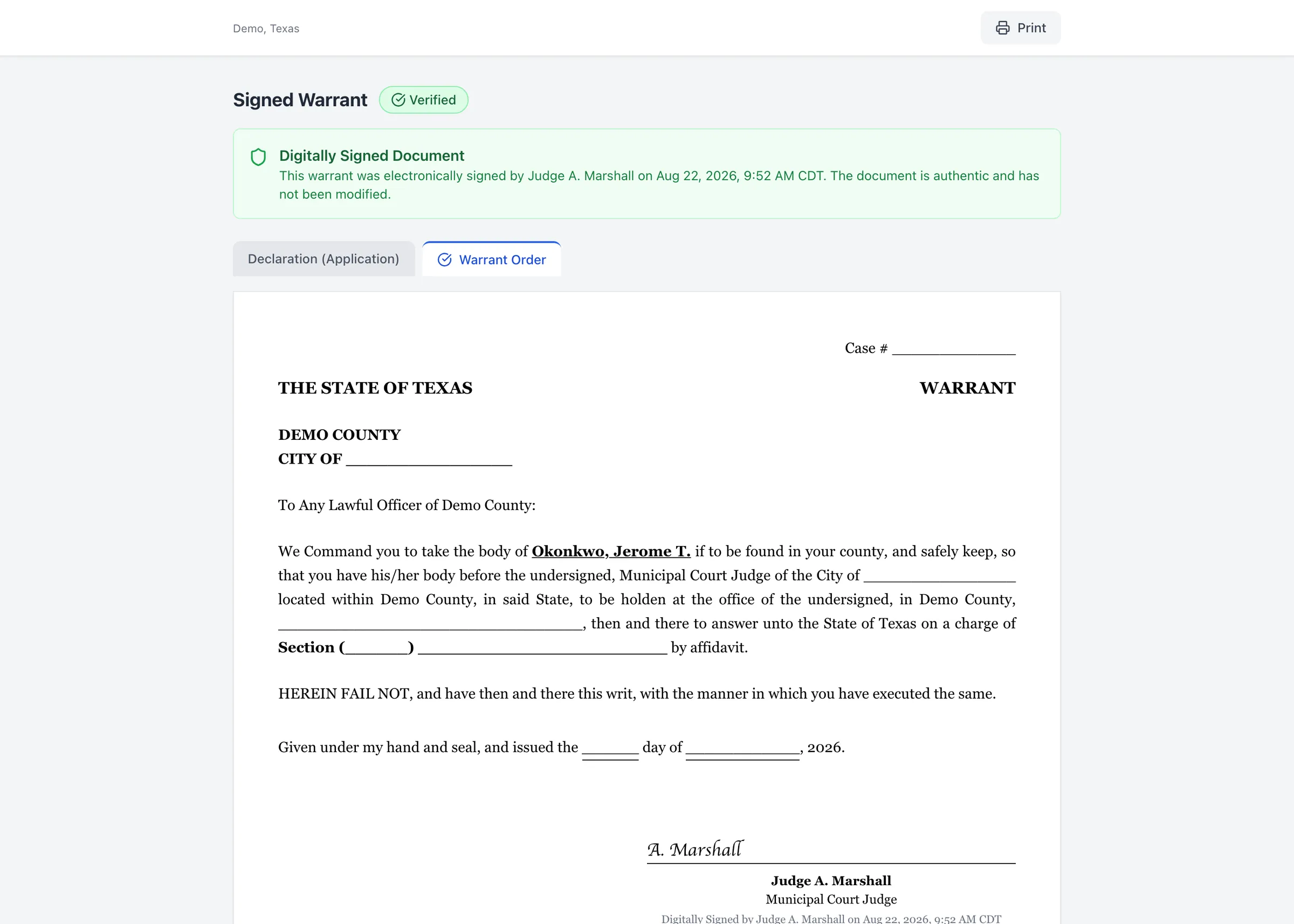
Publish a shareable, time-limited view of a signed warrant so the person served, counsel, and the public can confirm it is genuine.
A warrant record that holds up
A warrant is a legal instrument, and its record is evidence. The attestation in a signed warrant is written by the system, never by the person who drafted the application, so nobody can place it there in advance.
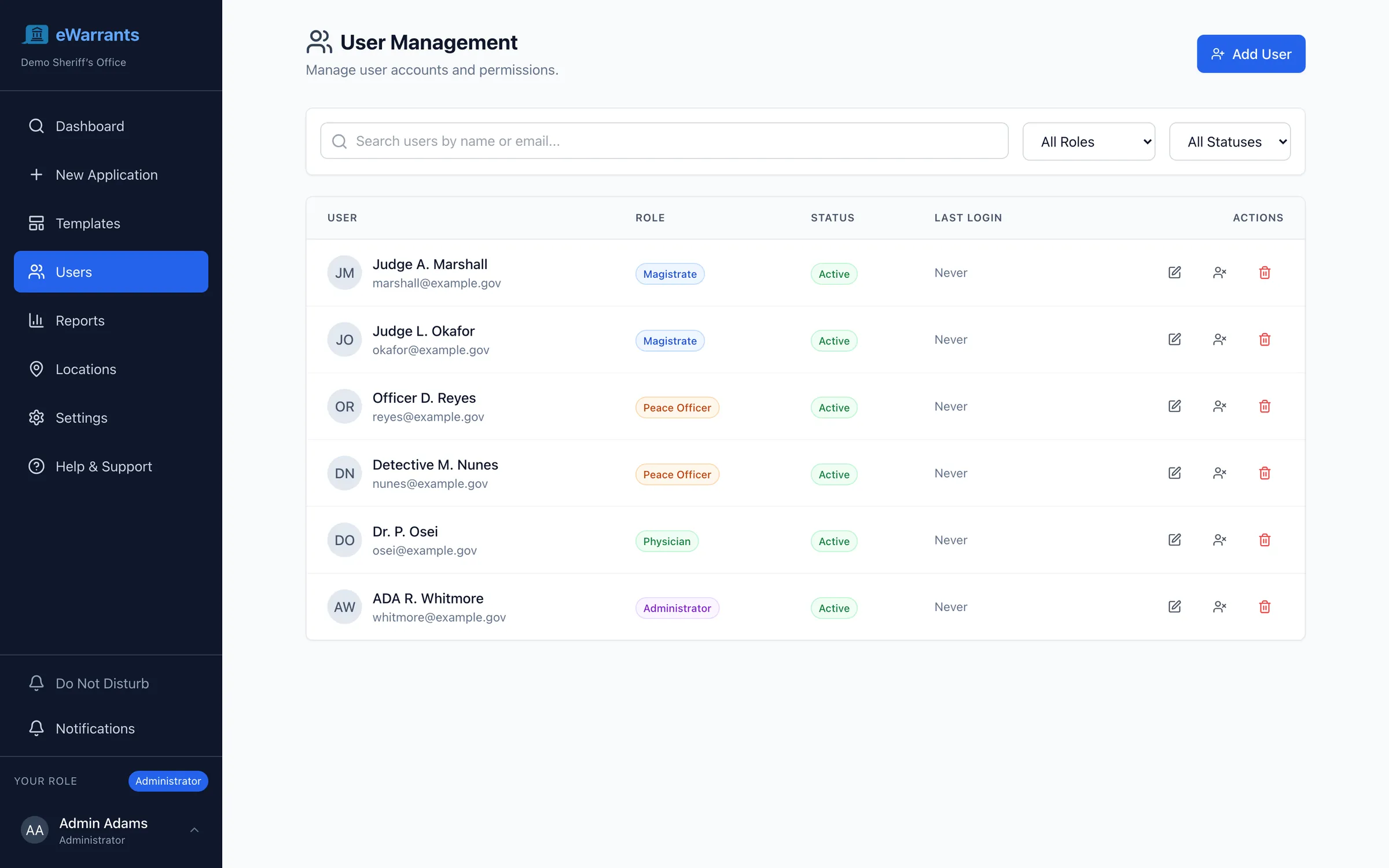
Roles your agency defines
Officers, clerks, prosecutors, judges, and administrators, plus clinicians where emergency detention warrants call for one, built from a full permission catalog rather than a fixed list. Signing authority, bench membership, and review rights are separate permissions your agency assigns.
Encrypted, private by default
Warrant information is encrypted field by field at rest. Every warrant is private unless your agency publishes it, and sealed matters are restricted to the roles you name.
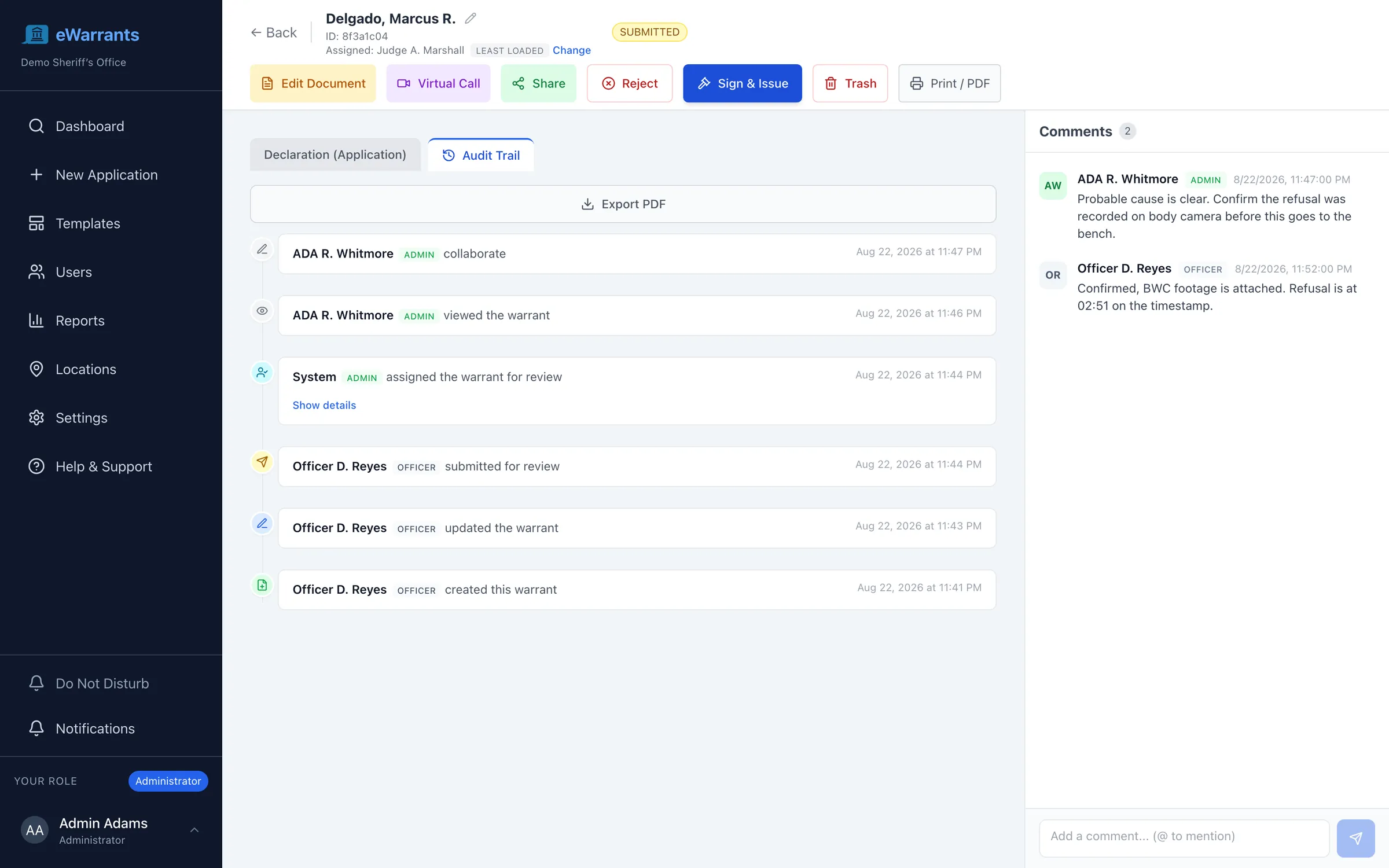
A complete timeline
Creation, edits, submission, routing, escalation, signature, rejection, service, uploads, and downloads. Every action is attributed, timestamped, and kept even if the warrant is later removed.
Verifiable by anyone who needs to
Publish a signed warrant to a shareable link and an officer at the door, defense counsel, or a member of the public can confirm it is genuine, current, and unexpired. The link is time-limited and expires with the warrant.
The public has a stake in this too
A warrant is an exercise of state power over a person, and the person on the receiving end is rarely counted as a stakeholder in warrant software. Faster turnaround is not only an efficiency gain: it means less time held while paperwork moves, warrants that clear the moment they are served rather than weeks later, and a document anyone can verify instead of taking on faith.
- Warrants clear from every database on service, so nobody is arrested twice on the same paper.
- A published warrant is verifiable at the door, by the person served and by counsel.
- Sealed and confidential matters stay sealed. Publishing is an explicit act, never a default.
- Records requests are answered from the record itself rather than reassembled from a file room.
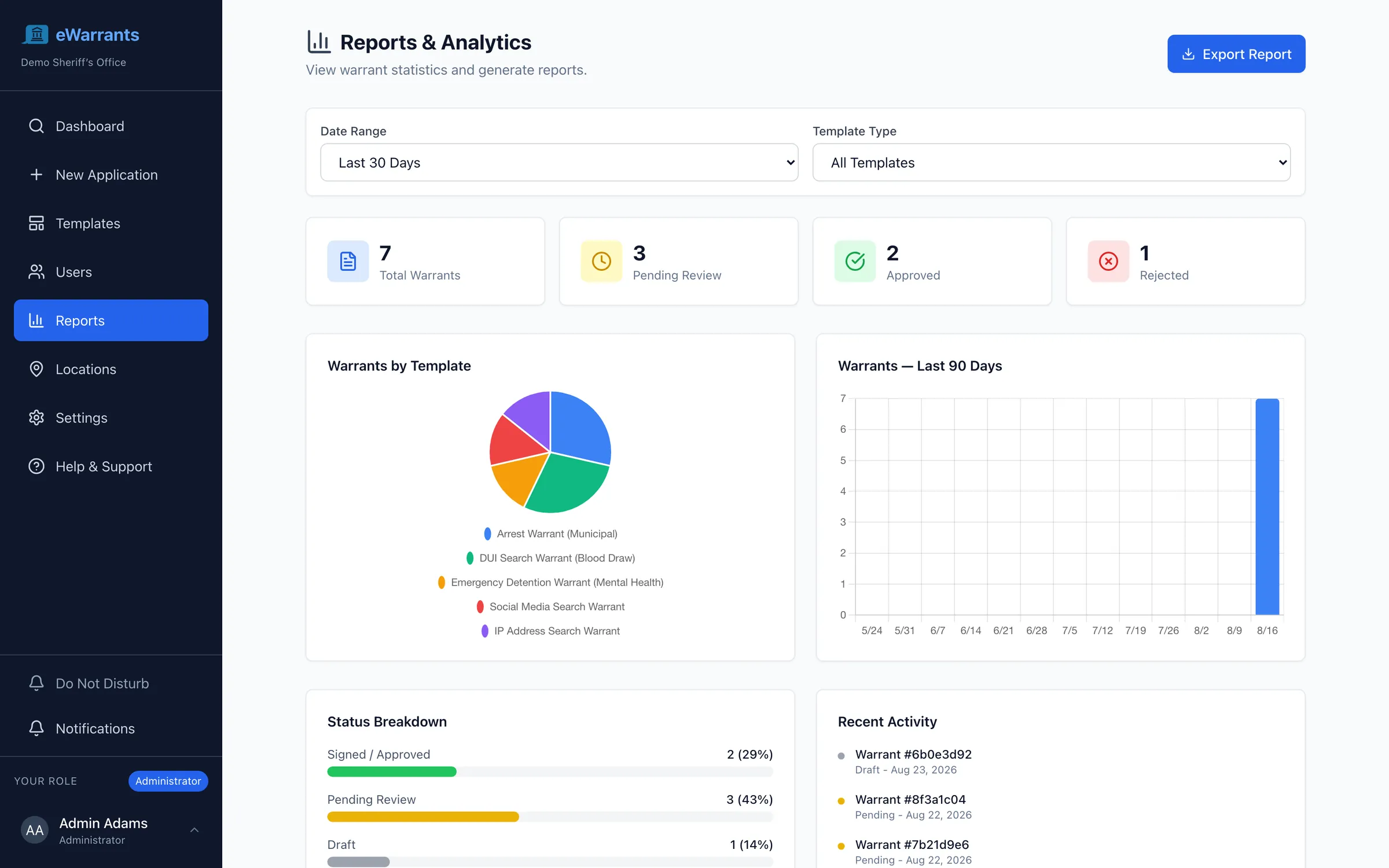
Answer how long warrants take, without building a spreadsheet
Volumes, turnaround times, status breakdowns, and activity by form type and date range, read from live data rather than assembled at the end of a quarter. A presiding judge asking why blood draws are slower than bench warrants gets an answer the same afternoon.
- Turnaround measured from request to signature, by form type and by judge.
- Escalation and rejection rates, so a routing rule that is not working shows up.
- Exportable for grant reporting, oversight bodies, and public records requests.
Runs on its own. Connects to what you keep.
Your agency can launch Electronic Warrants as a standalone system, or integrated with the case management system of your choice. It integrates with eCourtDate Case Management as readily as with a legacy provider, and you can change that decision later.
Standalone, it is still complete: its own users, roles, forms, records, and reporting. Either way you launch it, warrant data exchanges bi-directionally with the systems you keep, by API or secure file transfer, whichever they speak. Nobody re-keys anything. Start with what you need, connect what you have, and replace what no longer works.
Systems it connects to
- eCourtDate Case Management
- Legacy case management systems
- RMS, JMS, and CAD systems
- NCIC and state warrant databases
- Microsoft Teams and Slack
- Outlook, Google, and Apple Calendar
These are integration targets, not requirements. eCourtDate publishes a REST API, and connects just as readily to systems that expose SOAP, XML, or another interface, or that exchange scheduled files.
Built for criminal justice information
Warrant data is among the most sensitive an agency holds. The controls are the same ones the rest of the platform runs on.
CJIS compliant
Built to the Criminal Justice Information Services security policy, on AWS GovCloud.
Encrypted end to end
In transit and at rest, with warrant information encrypted field by field.
Single sign-on
Your identity provider, with multi-factor authentication and role-based access.
Complete audit trails
Every action on every warrant, retained for as long as your retention policy requires.
WCAG 2.2 AA
Accessible to staff and judges using assistive technology, on any device.
Works in the field
Installable on a phone or tablet, with push notifications. A judge can act from anywhere.
Turn warrant turnaround from days into minutes
Get a warrant from an officer to a signing judge and back in minutes, with a complete chain of custody, instead of driving paper across the county.
Built for the agencies on both ends of a warrant
One system across the agencies that request, review, issue, serve, and book. The warrant never changes hands on paper.
Law Enforcement
Officers in the field need digital tools that eliminate paperwork, accelerate warrant processing, and keep the public informed during critical events.
Learn moreCounty & District Courts
Multi-department courts managing complex case types need a platform that coordinates work across divisions, judges, and locations.
Learn moreProsecutors & Public Defenders
Attorneys need fast access to case documents, streamlined filing workflows, and reliable victim and witness communication.
Learn moreJails & Corrections
Jails and corrections agencies need the magistration clock to start at booking, hearings without transport, and supervision that continues after release.
Learn more
Electronic Warrants questions, answered
What administrators, judges, and IT directors ask before an agency moves its warrants off paper.
Do we need eCourtDate case management to run Electronic Warrants?
Will it connect to the case management system we already have?
How does the system find a judge who is actually available?
What happens if the assigned judge does not respond?
Can we use our own warrant forms?
Can a judge swear in an officer remotely?
Will an electronic warrant hold up in court?
Who can see a warrant, and can we seal one?
Does it register warrants with state and national databases?
How do officers record service and file returns?
Can judges serve more than one agency?
Can a warrant be reviewed before it reaches a judge?
How do judges keep track of what needs a signature?
Is there an app, or is it browser only?
Can we discuss a warrant without leaving the system?
Can we share a warrant outside the system?
How does this help the people warrants are served on?
How much detail do we get on service attempts?
Can we contact the person named on a warrant?
Is it safe to notify someone that a warrant exists?
Can other agencies check whether a warrant is active?
What reporting do we get?
See Electronic Warrants in action
A working demo with your warrant forms, your bench, and your routing rules.